
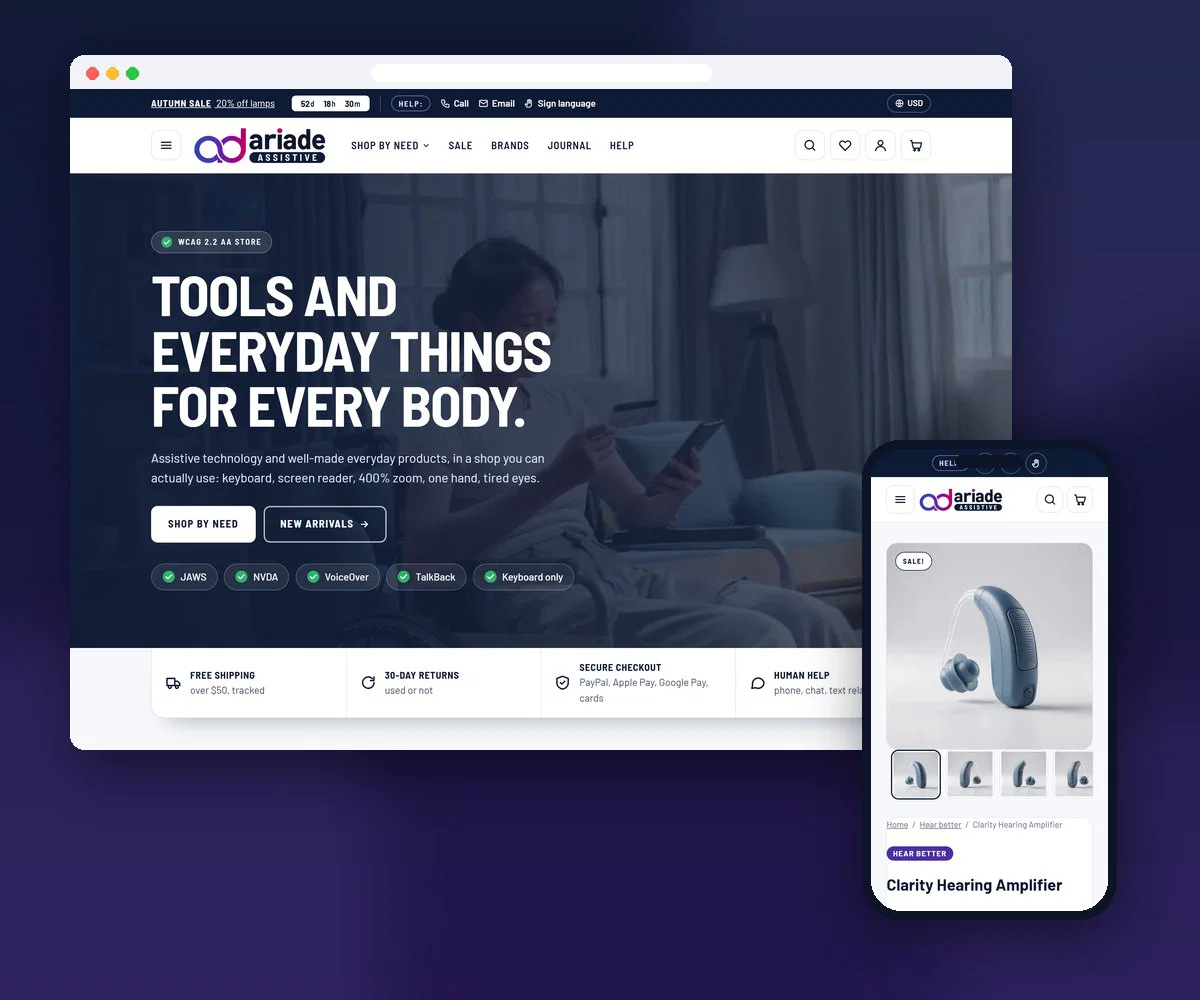
Accessible BigCommerce Theme
Ariade for BigCommerce: Accessible & ADA Compliance Theme
Ariade for BigCommerce is a ready, WCAG 2.2 AA compliant BigCommerce theme, built for real accessibility in code, not bolted on with an overlay. Every page is being tested by hand with JAWS, NVDA, VoiceOver and TalkBack before launch, so your online store works for every customer. It comes with a full accessibility statement and pairs with our accessibility services when you need more help. For any question about the theme, please contact us.
On this pageJump to any part of this page9 sections
Watch: Ariade for BigCommerce in 90 seconds

Preview code8w9bimd8es
The demo store is in preview mode. Use this code to enter.
Read the video transcript
Ariade, the accessible BigCommerce theme, explained by Shivaji Mitra. Captions are built into the video, and the full transcript follows.
Hello, I am Shivaji Mitra. I have been building websites since 2003, and today I work only on accessibility. I test online stores with a keyboard and with screen readers, and I fix what I find.
BigCommerce gives a store owner more built in than most platforms: brands, wishlists, product reviews, filters, product comparison, gift certificates, many product options, and customer groups. You do not need an app for any of them. But built in does not mean accessible. In most BigCommerce themes, these are exactly the places where keyboard and screen reader users get stuck. The filter changes and nothing is announced. The wishlist button has no name. The comparison table cannot be reached.
So I built Ariade for BigCommerce. It takes all eight of these native features and makes them work for everyone, to WCAG 2.2 Level AA. Every page is tested by hand with JAWS, NVDA, VoiceOver and TalkBack. It also adds a store locator and events with booking, again with no apps, and its texts come in twenty languages.
And with fewer apps, there is less code in your store that you do not control. If you run a BigCommerce store and want to know where it stands, send me your store address. I reply within one working day, in writing.
Accessibility tour
Take a look inside
What each page does for keyboard, screen reader and low-vision shoppers. Pick a page, read its accessibility points, then try it live.
Accessibility
- “In short”: an easy-read summary of the product near the top
- A written audio description of the product, for shoppers who cannot see the photos
- Colour and ear options are labelled choices, grouped and named for screen readers
- “Helps with” shows who the product suits, in words and icons

Accessibility
- Shop by need: see better, hear better, move and reach and more
- After a filter, screen readers hear how many products are left
- Sort and price change only when you press Apply, never on their own
- On phones, filters open from their own Filters button

Accessibility
- Every button says which product it is for, like “Remove: LED Stand Magnifier”
- Quantity buttons are named too: “Increase quantity of 3x Handheld Reading Magnifier”
- The free shipping bar tells you in words how close you are, not only with colour

Accessibility
- A big, clearly labelled search box, and the number of results in words
- Results split into Products and Pages and articles, with a count on each tab
- Each filter says how many products it has, like “See better, 2 products”

Accessibility
- Screen readers hear “Rated 4.0 out of 5”, not a row of star symbols
- Each review title is a heading, so you can jump from one review to the next
- Name, date and rating sit together, easy to read at any zoom level

Accessibility
- A real table with a caption and row headers, read row by row by screen readers
- Each product shows its plain “In short” summary and real stock status, like “In stock”
- Each remove button names the product, like “Remove LED Stand Magnifier from the comparison”
- On small screens the table scrolls sideways inside its own box, never the whole page

Accessibility
- Find a brand by typing its name, or by its first letter
- Letters with no brands are marked, and screen readers hear “no brands”
- The number of brands shown is always written above the list

Accessibility
- A “Show password” button, so you can check what you typed
- Email and password fields work with autofill and password managers
- Trouble signing in? A phone number and a written contact option, right on the page

Accessibility
- Every question is a real heading, so screen reader users can jump between them
- Short, plain-language answers, with a link to ask a real person
- Links to every help page, like shipping and returns, in one menu

Accessibility
- Leave a required field empty and the error appears right under it, in words with a ✕ icon
- The form says “Fields marked * are required” before you start typing
- Every field has a visible label, and name, email and phone work with autofill
- Trouble sending? A phone number is right there on the form

Accessibility
- Search by city or ZIP code, or use your location
- Filter stores by access: step-free, hearing loop, quiet room, ASL staff, parking or lift
- Each store lists its access features in words and icons
- The map is only a picture, and everything on it is also in the list

Accessibility
- Search the guides and stories from a labelled search box
- Every article title is a heading, with its topic, author and date in plain text
- Topics are solid pills, like “Shopping online”, so you know what each article is about

Accessibility
- Format is a solid pill, like “In person”, and access features are in words, like “ASL on request”
- Filter events by format, price or city, and switch between Upcoming and Past
- Every event has an “Add to calendar” link and a clear “Book a seat” button

Available soon
Ariade for BigCommerce
One price, no monthly fee. Licence for one live store, with 12 months of updates and support.
Ask about Theme onlyLicence for 1 store, 12 months of updates Available soon$149- PayPal or card
- Instant download
- WCAG 2.2 AA
- Human support

The package
What you get
What is built into Ariade, and how it is tested.
What is included in Ariade
Ariade is a ready, accessible BigCommerce theme: already built, audited and fixed. Install it on your BigCommerce store, then add your own logo, colours and products in Page Builder, with no code. This is what is included.
- Built to WCAG 2.2 AA in the code, not with an overlay
- Colour settings checked for contrast
- Built-in accessibility settings for your shoppers
- Clear, consistent navigation and page layouts
- Reviews, filters, events, store locator and cart drawer built in, no apps needed
- Tested by hand with JAWS, NVDA, VoiceOver and TalkBack
- Keyboard-only testing, and zoom testing at 200% and 400%
- Automated scans with Deque AXE, WebAIM Wave and Google Lighthouse
- Every issue found in testing is fixed and re-tested
- SEO basics: meta tags and structured data
- Mobile-friendly, fast-loading pages
- Documentation and support from the team that built it, with replies within 2 working days
Accessibility standards we follow: WordPress, Shopify, BigCommerce and Webflow accessibility coding standards.
Accessibility Health Score
The accessibility health score indicates how well a page meets the tested accessibility rules, on a scale of 0-100. Because automated scans catch only 25-30% of potential issues, every release is also audited by hand.
Google Lighthouse
Lighthouse is Google's open-source tool for automated website audits - performance, PWA, accessibility, best practices and SEO. Our themes pass its accessibility audit with a near-perfect score.
WebAIM Wave
WAVE, by WebAIM.org, gives visual feedback on accessibility by injecting icons and indicators into the page. Our themes return no WAVE errors or contrast failures.
Deque AXE-Core
AXE-Core, by Deque, is an industry-standard automated accessibility testing engine. Our themes return a clean AXE run with no violations.
Manual Audit
Automated tools catch only a fraction of real barriers, so every release gets a full manual audit with JAWS, NVDA, VoiceOver and TalkBack to confirm genuine WCAG 2.2 AA conformance.
Proven work
BigCommerce accessibility case studies
See how other store owners made their online stores accessible, with the real issues we found and how we fixed them.
Every store below runs on our BigCommerce Accessible Theme and was delivered by our BigCommerce accessibility consultancy. Real stores, real screen reader testing, and a written record of what changed.

Born To Be Sassy Accessibility Audit
This Born To Be Sassy accessibility audit and WCAG 2.1 AA remediation covered the online store…
View case study: Born To Be Sassy Accessibility Audit
Bead and Trim Accessibility Audit
This Bead and Trim accessibility audit and WCAG 2.1 AA remediation covered the online store of…
View case study: Bead and Trim Accessibility Audit
Icy Breeze Accessibility Audit
This Icy Breeze accessibility audit and WCAG 2.1 AA remediation covered the online store of a…
View case study: Icy Breeze Accessibility Audit

Before you buy
Proof and answers
The questions store owners ask us most.
FAQ
BigCommerce accessibility - frequently asked questions
Is BigCommerce accessible out of the box?
No platform is accessible out of the box, and BigCommerce is no exception. The platform gives you sound HTML to start from, but the theme, the apps and the content decide whether a shopper who uses a screen reader can actually buy. Stencil themes from the marketplace vary widely, and quick view, faceted search and cart drawers are the usual failure points. That is what a website accessibility audit measures.
Will an accessibility overlay or widget fix my store?
No. An overlay sits on top of the page and cannot repair a quick view that traps focus, a swatch that is not a button, or a checkout field with no label. Overlays are why many stores still receive demand letters after paying for “compliance”. Real remediation changes the theme code, which is what we do.
How long does it take to make a BigCommerce store accessible?
It depends on how many unique templates and journeys the store has, and on how many third-party apps are involved. A small catalogue on a clean Stencil theme is a matter of weeks; a large store with custom apps takes longer. You get a written scope, a delivery date and a price before anything starts.
Do you replace my theme or fix the one I have?
Either. If your design is working, we remediate the theme you have. If the theme is fighting you at every turn, our accessibility-ready BigCommerce theme is faster and cheaper than repairing it, and your brand design is applied on top of foundations that already pass.
What do I receive at the end?
The remediated store, a written report of what was found and fixed, a re-test confirming the result, and the documents your legal and procurement teams ask for: an accessibility statement and, where needed, a VPAT accessibility report.
Already a customer
Documentation and support
Everything you need after you install Ariade on your BigCommerce store: step-by-step documentation, and a direct line to the team that built the theme. We reply within 2 working days, Monday to Saturday, 9 am to 9 pm India Standard Time (IST).
Theme documentation
Self-help first
Every setting, step by step.
Plain-language guides for store owners, with an FAQ that answers most questions before you need to ask.
Demo store preview code8w9bimd8es
The demo store is in preview mode. Use this code to enter.