
WordPress Plugin · Free · GPLv2
The first accessible events plugin for WordPress
Ananyoo Accessible Events is a free accessible events plugin for WordPress - the first events plugin designed around accessibility instead of bolting it on at the end. It gives your site a dedicated Events section where every event states, with clear icons, exactly which accommodations it provides: wheelchair access, live captions, sign language interpretation, audio description, a hearing loop, a quiet room, accessible parking, step-free access and materials in accessible formats. Every screen - public pages and the admin alike - is audited to WCAG 2.2 Level AA.
New - the plugin now includes an accessible timeline: one shortcode that weaves your existing blog posts and events into a beautiful vertical story, in five designs, with your colours - and you can set how many words each entry's summary shows.
Live on WordPress.org
The difference
What makes this accessible events plugin different
Most events plugins treat accessibility as a checkbox. This one treats it as the product. Four features you will not find together in any other WordPress events plugin:
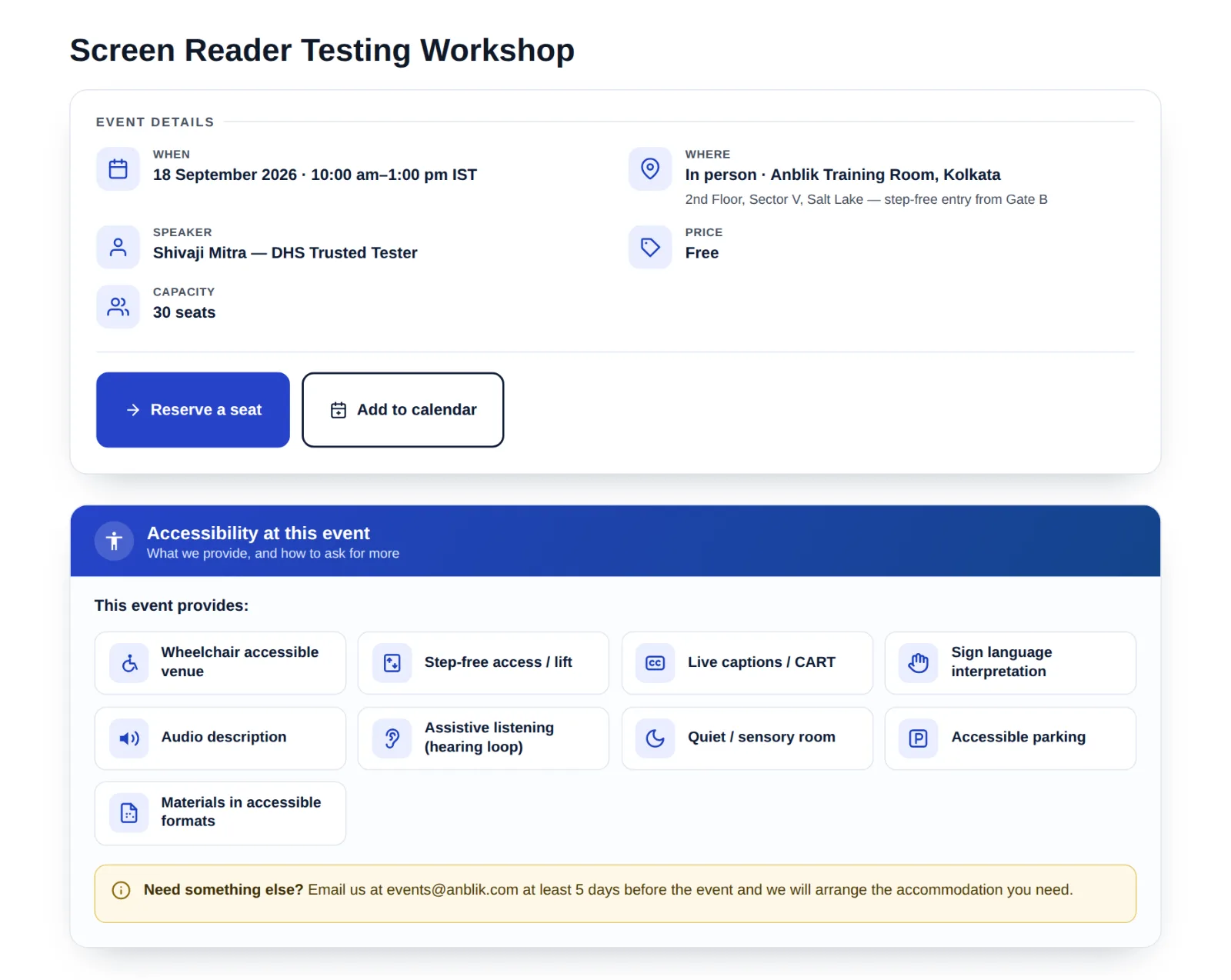
Accessibility at this event
Every event page carries a panel that states the accommodations provided - each with its own icon and plain-text label - plus a clear note on how attendees can request something more. Disabled visitors know what to expect before they register.
Filter events by accommodation
A visitor who needs captions or a wheelchair-accessible venue can filter the events list to only the events that provide it - a filter no other mainstream events plugin offers, and the reason this accessible events plugin exists.
Accessible add-to-calendar
A properly labelled add-to-calendar download for every event - not an unlabelled icon - plus a Subscribe button that keeps all your events up to date in a visitor's own calendar app automatically.
An audited admin too
The editor screens, settings and events list meet the same WCAG 2.2 AA standard as the public pages - labelled controls, visible focus, sufficient contrast and screen-reader announcements when you filter. Your event organisers may be disabled people too.
Every accommodation clearly stated - with real icons
When you publish an event, you simply tick the accommodations it provides. The plugin turns your ticks into a clean, icon-led panel that screen readers announce correctly and sighted visitors scan in a second. The accommodations covered are: wheelchair accessible venue, step-free access or lift, live captions (CART), sign language interpretation, audio description, assistive listening (hearing loop), a quiet or sensory room, accessible parking, and materials in accessible formats. There is also a free-text note where you tell attendees how to request anything else - because the accommodations you did not think of matter just as much.
New - an accessible timeline of your posts and events
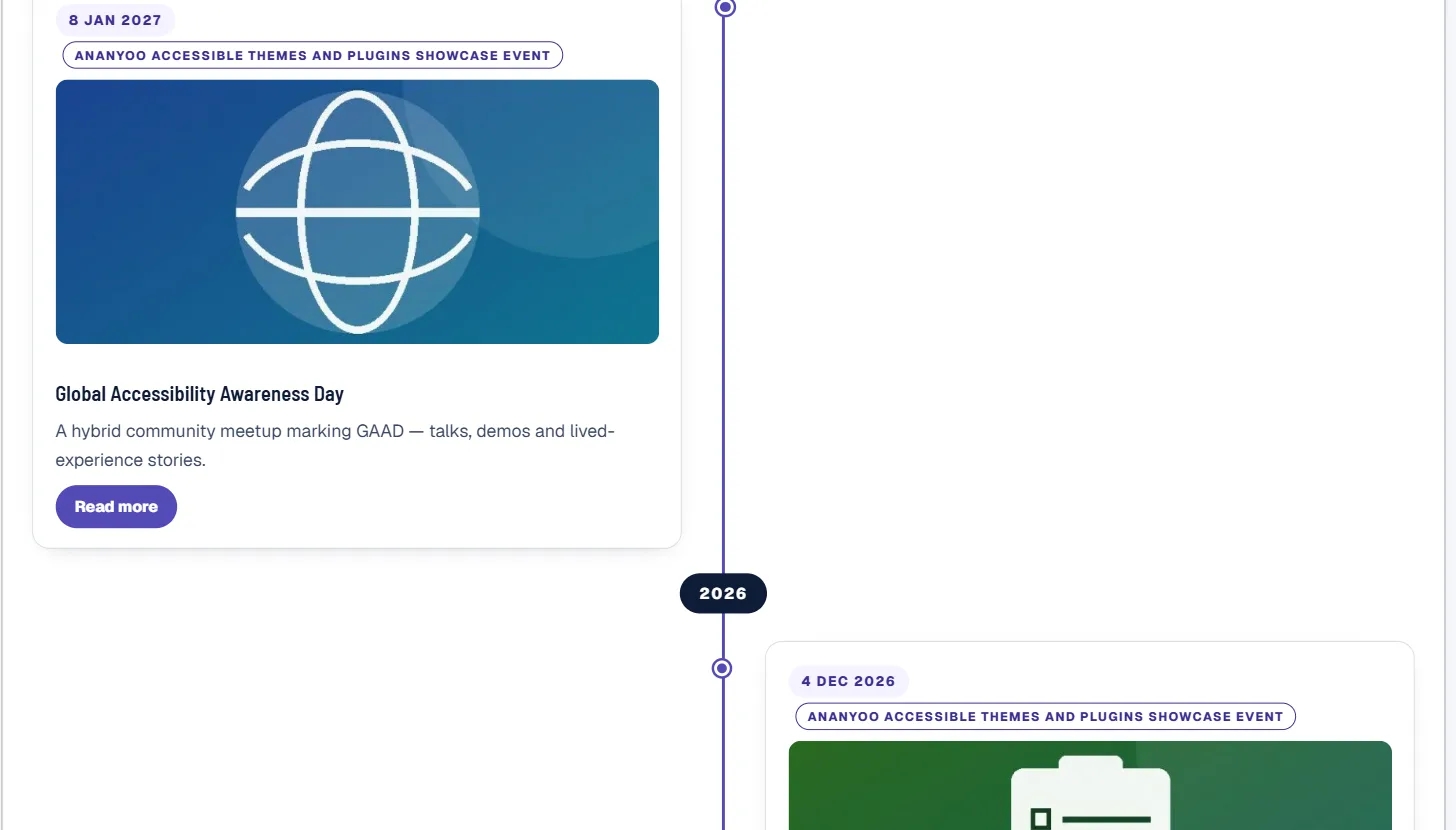
A community is more than its next event. The [ananevt_timeline] shortcode looks backwards as well as forwards: it weaves the blog posts and events you already have into one flowing, fully accessible timeline - year by year, photo by photo - the story of your organisation, telling itself. There is no separate “story” post type to maintain: the timeline always reflects your real content.
Five designs ship built in - Spine, Alternate, Photo journey, Compact ledger and Feature rows - with featured images on or off, year pills on the line, an Event/Blog tag on every entry, hand-picked entries or a category filter, and a “Load more” that works without JavaScript. Choose the design and all nine colours from Settings; every default pair meets WCAG AA out of the box, and the whole timeline is keyboard-operable, screen-reader labelled and reduced-motion safe.
Full feature list of the accessible events plugin
A dedicated Events section, separate from your blog, that survives any theme change. Structured event details - start and end date and time, time-zone label, mode (in person, online or hybrid), venue, address or joining note, register link with your own button text, price, capacity and speaker - all entered in a labelled meta box with native date and time inputs. Machine-readable dates with real time markup and Schema.org Event structured data, so search engines can show your events as rich results.
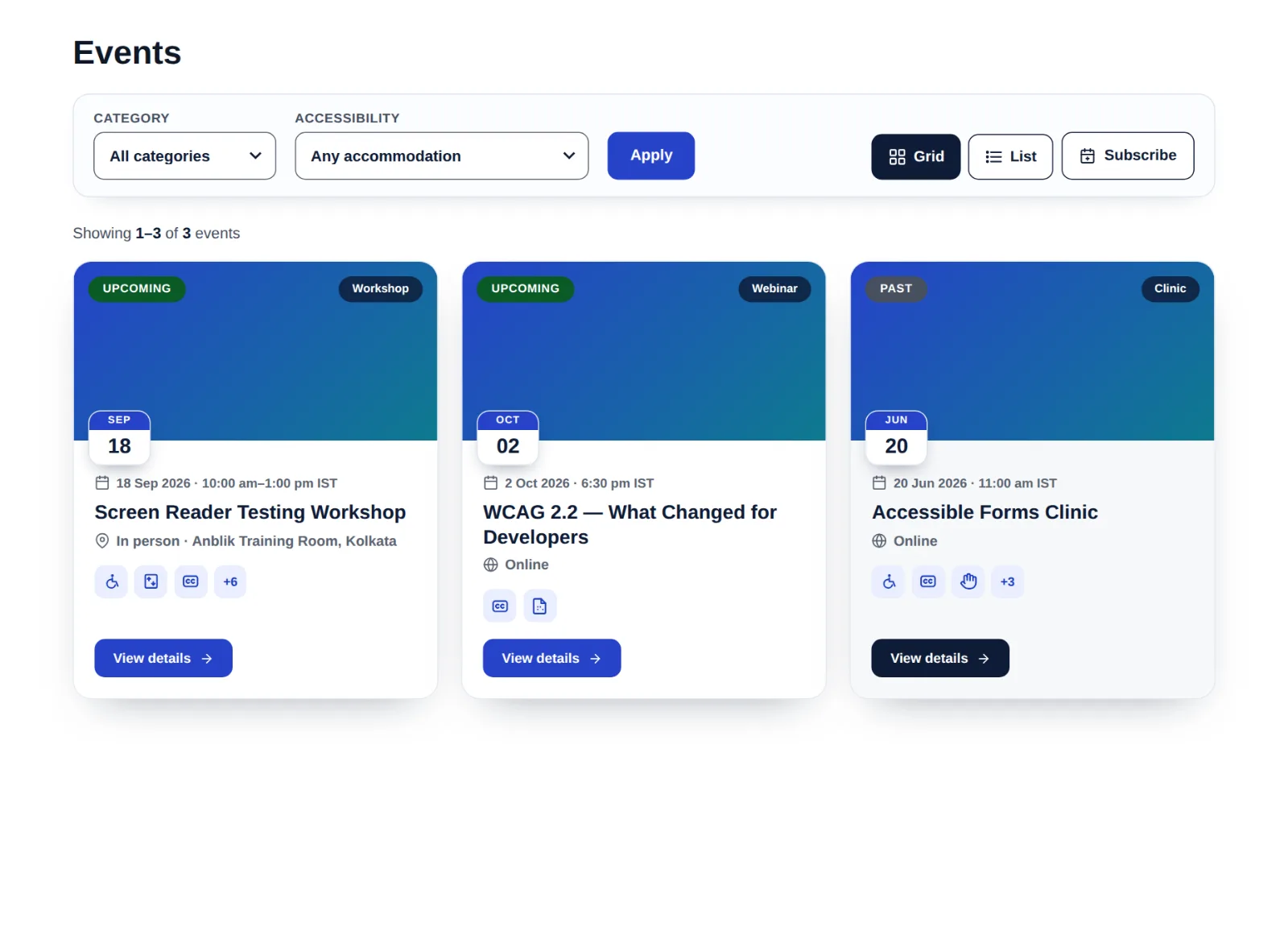
On the front end you get an events grid with Upcoming and Past status pills, a date tile on every card, category and accommodation filters, an accessible Grid/List view switch, pagination, and accommodation mini-icons right on the cards - so visitors see captions or wheelchair access before they even open the event. Online events can show the start time in each visitor's own time zone automatically, which your global attendees will quietly thank you for. An optional enquiry form pairs naturally with our Accessible Forms plugin, and every behaviour is a simple on/off toggle in a clean, branded settings screen.
And when you want to look back as well as forward, the [ananevt_timeline] shortcode turns those same posts and events into an accessible “Our Journey” timeline - five designs, your colours, no extra post type - perfect for anniversary and history pages that update themselves.
And like every plugin in our WordPress accessibility plugins family: no trackers, no phone-home, no external scripts, no paid tiers. Your event data stays in your own WordPress database.
How this accessible events plugin is tested
Every release is checked against WCAG 2.2 Level AA and Section 508 with automated tools plus real manual testing - because automated scanners catch only a fraction of the barriers real users hit. The plugin is built by Shivaji Mitra, an accessibility consultant and DHS Trusted Tester who has audited business, government and education websites since 2003, working with IAAP-certified colleagues. You can read how we work in our web accessibility case study.
How the accessible events plugin compares with a typical events plugin
These are the twelve checks an accessibility audit runs on an events section, with the verdict first. The middle column is what audits find most often. The right column is what Ananyoo Accessible Events does out of the box, with the WCAG 2.2 success criterion each row is built around.
| What an audit checks | Typical events plugin | Ananyoo Accessible Events Recommended |
|---|---|---|
| Accommodations statedWCAG 1.1.1, 1.3.1 | None Attendees must email to ask whether the venue is accessible. | Included Every event page carries a panel stating the accommodations provided, each with an icon and a plain-text label, plus a note on how to request more. |
| Filter by accommodation | None No mainstream events plugin offers it. | Included Visitors can narrow the list to events that provide captions, a wheelchair-accessible venue, a hearing loop and more. |
| Add to calendarWCAG 4.1.2 | Fails An unlabelled icon. | Passes A properly labelled add-to-calendar download for every event, plus a Subscribe button that keeps a visitor's own calendar up to date. |
| Admin screensWCAG 2.4.7, 4.1.2 | Fails Only the public pages get attention; the editor is unlabelled. | Passes Editor screens, settings and the events list meet the same WCAG 2.2 AA standard: labelled controls, visible focus, contrast and announcements when you filter. |
| Dates and timesWCAG 1.3.1 | Plain text Often no time markup and no time-zone handling. | Passes Real time markup and Schema.org Event data for rich results. Online events show the start time in each visitor's own time zone. |
| Events listWCAG 1.3.1, 2.4.6 | Fails A calendar grid that a screen reader has to read cell by cell. | Passes A grid with Upcoming and Past pills, a date tile on each card, category and accommodation filters, an accessible Grid or List switch and pagination. |
| Filters announcedWCAG 4.1.3 | Fails The list changes silently. | Passes Screen-reader announcements when you filter, on the public list and in the admin. |
| Keyboard and focusWCAG 2.1.1, 2.4.7 | Fails Custom date pickers the keyboard cannot use. | Passes Native date and time inputs in the editor, and every public control keyboard-operable with visible focus. |
| Timeline of posts and events | None A separate story post type to maintain, or a paid add-on. | Included One shortcode weaves your posts and events into an accessible timeline in five designs, with a Load more that works without JavaScript. |
| Reduced motionWCAG 2.3.3 | Fails Ignored. | Passes Honoured across the events list and the timeline. |
| Privacy | Phones home External scripts and trackers loaded on every page. | None No trackers, no phone-home, no external scripts. Event data stays in your own WordPress database. |
| Cost | Paid tiers Filters, calendar feeds and other basics behind a paid tier. | Free, GPL Every feature on this page is in the plugin on WordPress.org, with no paid tier. |
| Audit checks passed | Varies by plugin | 12 of 12 |
Tested with JAWS, NVDA, VoiceOver and TalkBack before each release.
FAQ
Accessible Events Plugin - Frequently Asked Questions
What is an accessible events plugin?
An accessible events plugin is an events plugin whose pages work for everyone - screen reader users, keyboard-only users and people using magnification - and, in our case, one that also helps you tell attendees which accommodations each event provides. Ananyoo Accessible Events does both: the pages meet WCAG 2.2 Level AA, and the "Accessibility at this event" panel and accommodation filter are features no other events plugin offers.
Is the plugin really free?
Yes. It is free and GPLv2 on WordPress.org, like all our plugins. No paid tiers, no locked features, no trackers, and no "accessibility overlay" gimmicks - what you install is exactly what you can read and audit yourself.
Will my events break if I change my theme?
No. Events and their data live in the plugin, not the theme, so they survive any theme change. It works with any standard WordPress theme, and pairs beautifully with our WCAG 2.2 AA WordPress ADA-compliance theme for a fully accessible foundation.
How do visitors add my events to their calendar?
Two ways. Every event has a clearly labelled "Add to calendar" button that downloads a standard calendar file, and the events list has a Subscribe button that adds a live feed of all your events to Google Calendar, Outlook or Apple Calendar - new events appear automatically.
Can it show a timeline of my posts and events?
Yes - add the [ananevt_timeline] shortcode to any page and the plugin weaves your existing blog posts and events into one accessible vertical timeline, newest first. Pick one of five designs and set your own colours in Settings, narrow it by category or hand-picked entries, and the “Load more” works even without JavaScript. See all five designs on the live timeline demo.
Does the plugin collect or share any data?
No. There is no tracking and no phone-home. Everything is stored in your own WordPress database with no external calls and no third-party scripts, so your visitors' data stays on your own site.
Can you help make the rest of my site accessible too?
Absolutely. Alongside this accessible events plugin we offer a full website accessibility audit and accessibility remediation service to bring your whole website up to WCAG 2.2 AA.
Get started
Get the accessible events plugin - free
Install it from WordPress.org, tick the accommodations your events provide, and give every attendee the information they need to show up with confidence. If you need an events feature the plugin does not have, or a custom accessible component built to the same WCAG AA standard, we build those too.