

Who needs this
Who needs web accessibility services right now
Very few people search for accessibility on a quiet afternoon. Something has usually happened, or is about to. These are the situations that bring most clients to this page, and each one links to the service that answers it.
A demand letter has arrived
A law firm has named barriers on your site and given you a date. You need an independent audit that confirms or disputes each claim, the barriers fixed, and a written record for your lawyer. Start with what to do in the first seven days.
You are a public body with a Title II date
Under the Department of Justice rule, state and local governments serving 50,000 people or more must meet WCAG 2.1 AA by 26 April 2027; smaller ones, and special districts of every size, have until 26 April 2028. The audit tells you the distance, the remediation closes it.
A buyer asked for a VPAT or Section 508 conformance
A procurement officer will not move the order without a conformance report on file. A VPAT in the edition they named, completed from real testing, is what unblocks it.
A redesign or new build is coming
The cheapest accessible website is the one built that way from the first commit. Accessible development and accessible design cost a fraction of retrofitting the same site a year later, after the demand letter.

The services
Six services, from first audit to ongoing care
You can book any one of these on its own, or run them as a programme. Every one is delivered to WCAG 2.2 Level AA, tested with real assistive technology rather than only scanners, and scoped in writing before any work begins.
Every WCAG 2.2 A and AA success criterion tested by hand on the templates a visitor can actually reach, with automated scans used only as a first pass. Delivered as a prioritised, plain-language report your developers can act on the same day.
The barriers an audit finds fixed at the source in the code, content and design, re-tested by hand, and logged against the criterion each one failed. Outsourced end to end, or beside your own developers so they learn as it happens.
A VPAT 2.5 in the Section 508, WCAG, EU or INT edition your buyer asked for, completed criterion by criterion from real testing, with a one-page summary for procurement and an issue list for developers.
New sites and applications built accessible from the first commit: semantic HTML, keyboard operation, visible focus, and screen reader testing at every stage rather than a patch at the end. On WordPress, built on my own accessible themes.
Colour palettes that pass contrast before anyone writes CSS, readable type, clear focus states and touch targets you can hit, so the brand looks sharp and works for every visitor, including in Windows High Contrast.
Periodic re-checks and support hours that keep a site conformant as content, plugins and features change, with a re-test after every major release so nothing quietly slips back.
How I work
How the work happens, whichever service you book
Everything is written down. The scope, the findings, the fixes and the sign-off each arrive as a document you can forward, so nothing depends on remembering what was said in a meeting, and your legal or procurement team can follow the trail a year later.
A written scope and quote within one working day
Send the site address and a line about the situation: the letter, the deadline, the buyer, the redesign. Within one working day you receive a scope stating what will be tested or built, on which templates, by when, and for how much. Nothing is charged until you approve it in writing.
Testing by hand, on real assistive technology
Automated scanners such as Deque axe, Google Lighthouse and WAVE run first and catch the obvious. The work that matters is manual: every page by keyboard alone, with JAWS and NVDA on Windows, VoiceOver on macOS and iOS, and TalkBack on Android, plus contrast and zoom checks. A green scan is never treated as proof.
Every finding and every fix documented
Each issue is recorded with the page, the component, the WCAG criterion, the assistive technology that exposed it, and a plain-language fix. Each fix is logged the same way when it is verified. This is what turns a report into evidence.
Confirmed in writing, then kept that way
You receive the re-test report and, if you need them, the VPAT or the public accessibility statement built from the same findings. Then periodic re-checks keep it true as the site changes.
Sample documents
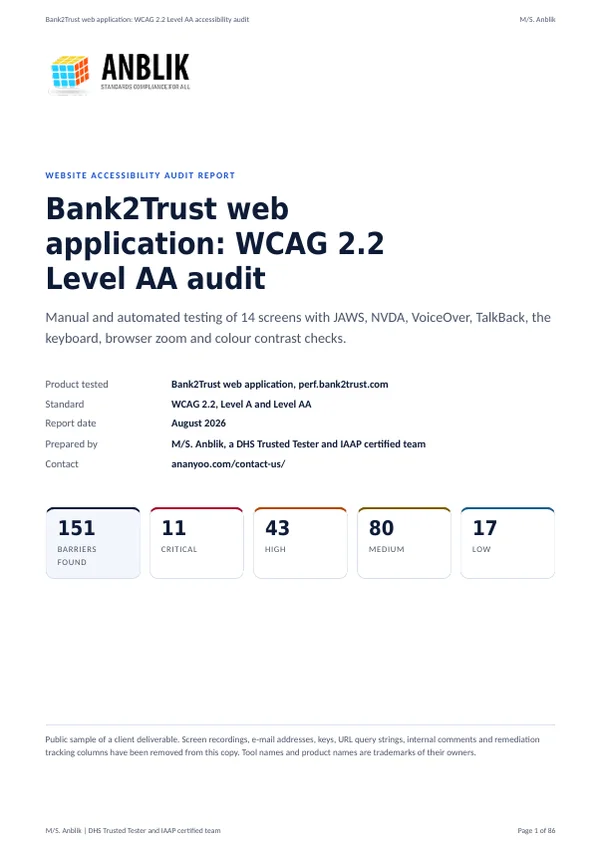
- Sample accessibility audit report (PDF, 1.8 MB): what step 3 looks like in practice. 86 pages, 151 barriers across 14 screens, each with its WCAG criterion, severity, the assistive technology that exposed it, the code and the fix.
- Sample accessibility conformance report, VPAT 2.5 Revised Section 508 edition (PDF, 241 KB): what step 4 looks like when a buyer asks for a VPAT.
Real client deliverables shared as public samples, with e-mail addresses, keys, screen recording links and internal tracking columns removed. Both PDFs are tagged and have bookmarks, so they read properly with a screen reader.

Test coverage
What the testing actually covers
Different screen readers fail differently, which is why one is not enough. This is the environment list every service on this page is tested against, and it is the same list that appears in the reports.
| Environment | What it catches |
|---|---|
| JAWS and NVDA on Windows 11 | The two screen readers most blind users in the United States rely on, in Chrome, Edge and Firefox. Unlabelled controls, silent state changes, missing landmarks and broken reading order. |
| VoiceOver on macOS and iOS | Safari behaves differently from Chrome, and touch navigation on iPhone exposes gestures, swipe order and custom controls that pass on a desktop. |
| TalkBack on Android | The screen reader on the phone most of the world carries. Focus order, touch target size and announcements on the smallest screens. |
| Keyboard only | No mouse at any point. Menus, modals, forms, carousels and the checkout, with focus visible the whole way through and a way out of everything with Escape. |
| Zoom and forced colours | 200 and 400 percent browser zoom, where content must reflow without sideways scrolling, and Windows High Contrast, where a surprising number of sites simply vanish. |
| Colour contrast analysis | Every text and control colour measured, not eyeballed: 4.5:1 for text, 3:1 for large text, controls and meaningful graphics, including hover and focus states. |
| Automated first pass | Deque axe, Google Lighthouse and WAVE, run on every template before the manual work starts, so the high-volume issues are listed quickly and the manual time goes where a tool cannot reach. |
Platforms
Platforms I work on, and the ones I build for
Most accessibility failures are not in the platform. They are in the theme somebody bought, the builder they laid it out with, or the plugin they installed to save an afternoon. Knowing where each platform breaks is most of the job, and on several of them I build the accessible alternative myself.
WordPress
Audit, remediation and new builds. I publish an accessible WordPress theme and a family of accessible plugins, so fixes often mean replacing the failing component with one that already passes. See the WordPress accessibility audit.
Shopify
The platform with the largest volume of ADA lawsuits, mostly over product pages, variant selectors and checkout. I build a Shopify accessibility theme and audit stores on any theme. See the Shopify accessibility audit.
BigCommerce
Stencil themes, faceted search and the multi-step checkout each have their own failure patterns. I build a BigCommerce accessibility theme. See the BigCommerce accessibility audit.
Webflow, and custom applications
Webflow projects, where the designer's canvas hides the heading structure, and custom applications on React, Vue, Angular or anything else, where the component library decides most of the outcome. See the Webflow accessibility audit.
Platforms and frameworks I have audited, fixed or built on





Logos are trademarks of their respective owners and are shown to indicate experience with the platform, not partnership.

Standards
Standards every service is measured against
Reports name the exact criterion each issue relates to, so your legal and procurement teams can see conformance at a glance rather than guessing from a generic pass or fail.
| Standard | What it is, and who asks for it |
|---|---|
| WCAG 2.2 Level AA | The W3C guidelines nearly every law and contract points to. Level AA is the working target on every project; findings are mapped to 2.1 or 2.0 where a contract names the older version. |
| ADA Title II and Title III | United States public bodies under the DOJ web rule, which names WCAG 2.1 AA, and businesses open to the public, where courts apply WCAG as the benchmark. Demand letters almost always cite Title III. See ADA website compliance. |
| Section 508 | United States federal agencies and anyone selling to them. The Revised standards incorporate WCAG 2.0 AA. See Section 508 compliance testing. |
| EN 301 549 | The European harmonised standard behind public procurement and the European Accessibility Act, in force since June 2025. EU buyers, and increasingly UK ones. |
| AODA | Ontario's accessibility law, which requires WCAG 2.0 AA for public bodies and for private organisations with fifty or more employees. |

Turnaround and cost
How pricing works, and how fast the work moves
I do not publish a single price for any service, because an honest figure depends on scope, and scope varies enormously between a ten-page brochure site and a store with a logged-in account area. What I can promise is that the factors are simple, and that you will have a written figure within one working day.
Templates and journeys, not page count
A site with two hundred posts has one post template. What sets the price is the number of unique layouts and the number of journeys that take money, bookings or applications, because those are what get tested end to end.
Logged-in areas and custom components
Member portals and dashboards roughly double the surface. Date pickers, maps, charts and other non-native controls take longer than a paragraph of text, because each one has to be driven with four screen readers.
What you need at the end
A developer issue list is the baseline. A VPAT, a Section 508 report or a public accessibility statement is additional writing on top of the same testing, and it is quoted as such rather than hidden in the audit price.
Timing
A small marketing site is usually audited within a week and fixed within another. Large sites and applications take longer, and the written scope gives you dates rather than estimates. Because I work from India, most United States clients find that work agreed at the end of their day is waiting for them the next morning.
For a fuller explanation of what drives the number, read what an accessibility audit costs.

Questions
Web accessibility services, answered
What do your web accessibility services include?
The full journey: a WCAG 2.2 AA audit, hands-on remediation of what it finds, VPAT and conformance reporting, accessible design and development of new sites and applications, and monitoring so the site stays conformant as it changes. You can book a single service, such as a one-off audit, or combine them into a programme. Everything is delivered in plain language with a scope and timeline agreed in writing before any work begins.
Which accessibility standards do you test against?
Every project is measured against WCAG 2.2 Level AA, the benchmark most ADA and Section 508 requirements point to. Where a client needs it, I also map findings to EN 301 549 for European procurement, to AODA, and to the specific criteria named in their contract. Reports state exactly which criterion each issue relates to.
Do you test with real assistive technology or only automated tools?
Both, in the right order. Automated scanners such as Deque axe, Google Lighthouse and WAVE catch the obvious, high-volume issues quickly, but they find only a fraction of real barriers. The important work is manual: every page by keyboard alone and with real screen readers, JAWS and NVDA on Windows, VoiceOver on macOS and iOS, and TalkBack on Android, plus contrast and zoom checks.
Will I receive a VPAT or conformance report I can share?
Yes. I produce VPAT 2.5 conformance reports in whichever edition your buyer names, completed criterion by criterion from the testing, written to hand straight to procurement and legal teams. As a DHS Trusted Tester working with IAAP-certified colleagues, I make sure the report reflects real testing rather than an automated score, so it stands up to scrutiny.
Do you work with clients in the United States, given the time difference?
Most of my clients are in the United States, and the time difference works in their favour. Everything is done in writing, so there is no scheduling problem: you send the brief or the approval at the end of your day, and the scope, the findings or the fixes are usually waiting when you start the next one. Written work also leaves a record, which is what a lawyer or a buyer asks for.
Can you fix a site that somebody else audited or built?
Yes. Send the report you have, or the site itself. I check a sample of the findings against the live site to make sure the report is sound, then quote the remediation from there. If the report turns out to be an automated scan with no manual testing behind it, I will tell you, because fixing only what a scanner found leaves most of the real barriers in place.
Next step
Tell me the situation, get a written quote
Send the site address and a line about what is happening: the letter, the deadline, the buyer, the redesign. Within one working day you get a written reply saying which service you actually need, what it involves, and what it costs. No call is needed, and nothing is charged until you approve the scope in writing.
Not ready for a quote? Start with the free WCAG checklist PDF: all 55 criteria with how to check each one.