

Who needs this
Who needs accessibility remediation right now
An audit tells you what is wrong. Remediation is the part where the site actually changes, and it is the part most organisations get stuck on, because the report lands on a developer who has never been asked to fix a keyboard trap before. If any of these sounds like you, this is the page you need.
A demand letter or lawsuit has arrived
The letter names specific barriers and gives you a deadline. What you need is those barriers fixed, verified, and written up so your lawyer can show it was done. Start with what to do in the first seven days after a demand letter, then send me the list.
You are a public body under the ADA Title II rule
State and local governments serving 50,000 people or more have until 26 April 2027 to meet WCAG 2.1 AA under the Department of Justice rule. Smaller ones, and special districts of every size, have until 26 April 2028. Either way, the audit is the easy half. The fixing is what has to be finished by the date.
A buyer wants a VPAT you can stand behind
A conformance report full of “Does Not Support” loses the bid. Fixing the failures first, then documenting honestly, is the only way to a VPAT that helps rather than hurts.
The report is sitting unfixed
Your site was built by an agency that has moved on, or your in-house developer is honest enough to say accessibility is not something they know. The audit has been open for months. This is the most common situation of all, and the quickest to solve.

What is included
Exactly what accessibility remediation includes
Everything an audit can find, fixed at the source, not covered with a widget. Each item below is a real line of work, and every one of them is logged against the WCAG success criterion it satisfies, so nothing is vague at the end.
Code fixes
Semantic HTML where a div was doing a button’s job, correct ARIA where it is genuinely needed and removed where it is not, visible focus, a logical tab order, keyboard access to every control, and named landmarks so a screen reader user can move around the page the way a sighted user scans it.
Content fixes
Alt text written for what the image means on that page, heading levels that follow the structure rather than the font size, link text that says where it goes, captions and transcripts for video and audio, and form labels that stay on screen after somebody starts typing.
Design fixes
Colour contrast brought to 4.5:1 for text and 3:1 for controls and graphics, focus indicators you can actually see, touch targets large enough to hit, and layouts that reflow at 400 percent zoom instead of forcing sideways scrolling. Where a brand colour cannot pass, I propose the nearest one that does and show you both.
Component fixes
The pieces that fail most often: menus that trap the keyboard, modals that do not return focus, carousels that cannot be paused, date pickers with no keyboard path, custom selects that announce nothing, and checkouts where the total changes silently. Each one is rebuilt or repaired to work with the four screen readers I test with.
Platform-specific work
WordPress themes and plugins, Shopify and BigCommerce themes, Webflow projects, and custom applications on any framework. On WordPress the fix often belongs in the theme rather than the page, so it holds when the content changes. I build accessible themes and accessible plugins myself, which is why I know where the bodies are buried.
The written record
A change log with one entry per issue: what was wrong, which criterion it failed, what was changed, and how it was verified. A re-test report at the end. This is the part a lawyer, a procurement officer or a Title II coordinator actually asks for.
Two ways to work. With outsourced remediation my team takes the issue list and fixes it end to end, which suits organisations with no in-house accessibility skills. With experts in residence we work beside your own developers in their codebase, correcting issues while explaining each one, so the team learns accessible coding for the long term. Many clients combine the two: we clear the backlog, then stay on support hours while their developers take over.
Third-party reports
Remediation support for third-party automated audits
Many organisations already pay for a monitoring platform or have a scan report from an audit firm. You do not need a second audit from me before the fixing starts. Send the export as it is, from any of the tools below, and I turn the raw findings into a fix list your developers can follow, remove the false positives an automated scan always includes, add the manual checks no scanner can make, and re-test against the same tool afterwards so your score moves for the right reasons.










I have worked with each of these tools on client projects. Tool names and logos are trademarks of their respective owners and are shown to indicate compatibility, not partnership.

How the work happens
How accessibility remediation works, step by step
Everything is done in writing. You get a document at each stage that you can forward to a colleague, a lawyer or a buyer, and nothing depends on remembering what was said in a meeting.
Scope from the audit, and a written quote in one working day
Send me the audit report, whether I wrote it or somebody else did, along with the site address and any deadline you are working to. If there is no audit yet, I audit the site first, because fixing without a full picture wastes money. Within one working day you receive a written scope: what will be fixed, in what order, on which templates, and what it costs.
Fix in priority order, blockers first
Anything that stops a person completing a task comes first: keyboard traps, forms that cannot be submitted, checkouts that cannot be finished, content that cannot be reached at all. Then the barriers that make tasks hard. Then the polish. Work happens on staging if you have one, or on the live site with your written approval for each release. Every change is described in plain language before it goes live.
Verify every fix by hand
Each corrected issue is re-tested the way the original audit tested it: JAWS and NVDA on Windows, VoiceOver on macOS and iOS, TalkBack on Android, keyboard alone, and 200 and 400 percent zoom. Automated scanners run as well, but a green scan is never treated as proof. A fix is closed when a person using assistive technology can complete the task, not when the tool stops complaining.
Re-test report, and a record you can hand over
At the end you receive the change log, the re-test report, and a short summary written for whoever asked for this in the first place. If you need a public accessibility statement or a VPAT afterwards, the same findings feed straight into them, and you do not pay for the testing twice.
What you receive
What you receive at the end
A site that passes, and the paperwork that proves it. Every item below is delivered as a file you keep, not a dashboard you lose access to.
The fixed site
Every issue in the agreed scope corrected in the code, the content or the design, on your own hosting, in your own repository. Nothing is hidden behind a third-party script that stops working when a subscription lapses.
The change log
One entry per issue: the page or template, the WCAG criterion, what was wrong, what changed, and the date. Written so a developer who was not involved can follow it a year later.
The re-test report
The original findings, each marked closed or still open, with how it was verified and on which assistive technology. Anything still open is stated plainly with a date, because a report that claims everything passes is the first thing a lawyer checks.
Handover notes for your team
The patterns that were fixed and how to keep them fixed: how to add an image, a form, a modal or a menu item without reintroducing the problem. Short, specific to your site, and written for the person who will edit it next.
Sample documents
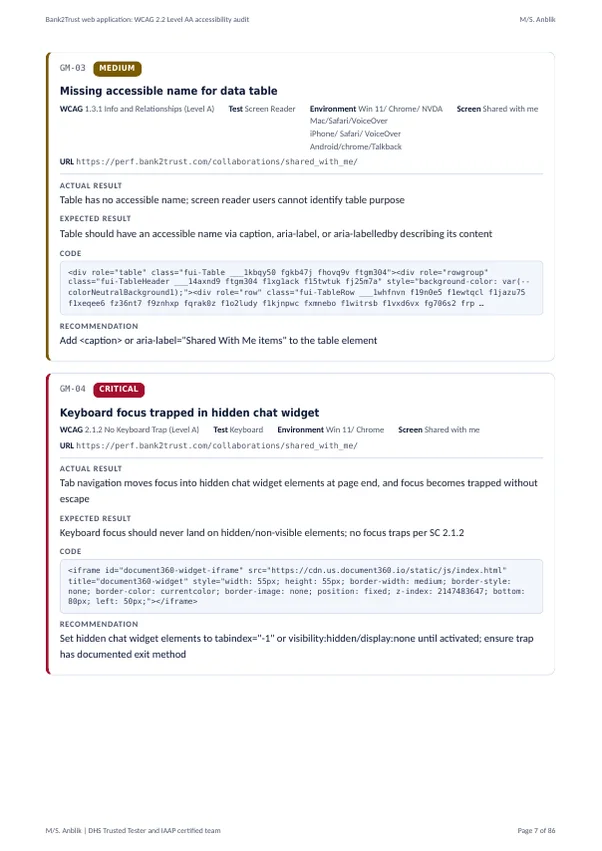
- Sample accessibility audit report (PDF, 1.8 MB): 86 pages, 151 barriers, each with its WCAG criterion, severity, the test that found it, the code and the fix. The re-test report follows the same layout.
- Sample accessibility conformance report, VPAT 2.5 Revised Section 508 edition (PDF, 241 KB): the ACR that goes with the audit when a buyer or procurement team asks for one.
Both are real client deliverables shared as public samples. E-mail addresses, keys, screen recording links and internal tracking columns have been removed. Both PDFs are tagged and have bookmarks, so they read properly with a screen reader.

Standards
Standards the fixes are measured against
Every fix is mapped to a named success criterion, because “more accessible” is not something you can put in front of a buyer or a court. These are the standards I work to, and who tends to ask for each one.
| Standard | What it is, and who asks for it |
|---|---|
| WCAG 2.2 Level AA | The W3C guidelines nearly every law and contract points to. Level AA is the working target. Fixes are also mapped to 2.1 and 2.0 where a contract names the older version. |
| ADA Title II and Title III | United States public bodies (Title II, with the DOJ web rule naming WCAG 2.1 AA) and businesses open to the public (Title III, where courts apply WCAG as the benchmark). Demand letters almost always cite Title III. |
| Section 508 | United States federal agencies and anyone selling to them. The Revised 508 standards incorporate WCAG 2.0 AA. See Section 508 compliance testing for the reporting side. |
| EN 301 549 | The European standard behind public procurement and the European Accessibility Act, in force since June 2025. Asked for by EU buyers, and increasingly by UK ones. |
| AODA | Ontario’s accessibility law, which requires WCAG 2.0 AA for public bodies and for private organisations with fifty or more employees. |

Turnaround and cost
What accessibility remediation costs, and how long it takes
I do not publish a single price, because the honest answer depends on the site, and a number that fits one site misleads the next. What I can tell you is exactly what moves the price, and that you will have a written figure within one working day of sending the audit.
Templates, not pages
A site with two hundred product pages has one product template. Fixing the template fixes them all. The count that matters is unique layouts and components, which is why a small site with a page builder can cost more than a large site on a clean theme.
Where the fix lives
A wrong heading level in the content is a five-minute change. A carousel that cannot be paused, built into a purchased theme, means replacing the component. The audit tells us which kind each issue is before anything is quoted.
Transactions and logged-in areas
Checkouts, booking flows, account dashboards and applications carry more risk and more testing, because a failure there stops a sale or a service, not just a page.
Timing
A small marketing site with a clear audit is usually fixed and re-tested within a week. Large sites and applications with many templates take longer, and the written scope gives you the dates. Because I work from India, fixes agreed at the end of your day are often waiting for you the next morning.
If you would like to understand the cost side before sending anything, what an accessibility audit costs explains the same factors from the audit end.

Questions
Accessibility remediation, answered
What is website accessibility remediation?
Remediation is the stage where the barriers found in an audit are actually fixed. The code, the content and the design are corrected so that people who use screen readers, keyboards or screen magnification can use the site without trouble. It is the part of any accessibility project that turns a report into a site that works.
Can you fix a site you did not audit?
Yes, and it happens often. Send the report you have. I read it, check a sample of the findings against the live site to make sure the report is sound, and quote from there. If the report turns out to be an automated scan with no manual testing behind it, I will say so, because fixing only what a scanner found leaves most of the real barriers in place.
Which platforms and standards does your remediation cover?
WordPress, Shopify, BigCommerce, Webflow, and custom applications on any framework, on web and mobile. Every change is aligned with WCAG 2.2 Level A and AA and, where the client needs it, mapped to Section 508, EN 301 549 or AODA. Each fix is verified with automated tools and then by hand in JAWS, NVDA, VoiceOver and TalkBack.
How long does accessibility remediation take?
It depends on the number of issues and the number of templates, not on the number of pages. A small site is often fixed within a week. Large applications with many templates and journeys take longer, and the written scope you receive before work starts gives you the dates rather than an estimate.
What is the difference between outsourced remediation and experts in residence?
With outsourced remediation my team takes the reported issues and fixes them from start to finish, which suits organisations with no in-house accessibility skills. With experts in residence we work directly beside your own developers, correcting issues while explaining each one, so the team learns accessible coding for the long term. Many organisations combine both to move quickly now and build skills for later.
Do you offer support once the fixes are done?
Yes. Accessibility is never a one-time task, because new pages, plugins and features quietly introduce fresh barriers. I offer support hours and periodic re-checks so the site stays conformant as it grows, and I re-test after major releases or redesigns so nothing regresses. See accessibility monitoring and maintenance for how that works.
Next step
Send the audit, get a written plan
Send the audit report and the site address. Within one working day you get a written scope: what will be fixed, in what order, how each fix will be verified, and what it costs. No call is needed to get started, and nothing is charged until you approve the scope in writing.
Not ready for a quote? Start with the free WCAG checklist PDF: all 55 criteria with how to check each one.