


As online shopping becomes the default, accessible e-commerce is no longer optional for any serious store. Digital storefronts must welcome everyone, including people with disabilities. Accessibility is more than compliance-it’s equity, usability, and respect. With 1.3 billion disabled people worldwide, inclusive design builds trust, enhances reputation, and drives sustainable business growth.
The Current Challenge
Despite growing awareness, most platforms still fall short in delivering truly accessible e-commerce. The WebAIM Million 2025 study found that 94.8% of home pages contain detectable accessibility errors, averaging 51 issues per page. These gaps result in lost revenue, frustrated users, and legal risks. Yet they also represent opportunities: every improvement in accessibility enhances usability for all shoppers, including those with temporary impairments, older adults, and mobile users.
Why Accessible E-commerce Matters for Every Store
Accessible e-commerce is critical because it ensures that every shopper, regardless of ability, can engage with digital platforms seamlessly. When websites are not designed inclusively, customers with disabilities often encounter barriers that prevent them from browsing products, completing purchases, or even understanding basic content. This not only limits their shopping experience but also results in lost sales opportunities for businesses.
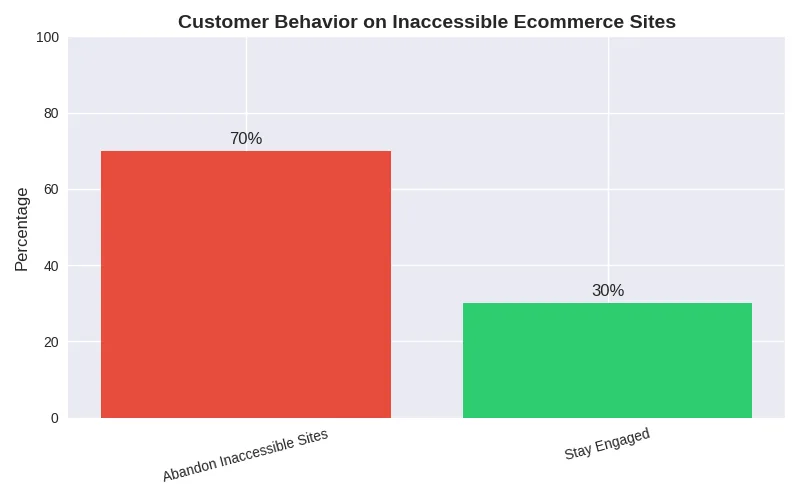
Building accessible e-commerce stores expands market reach by welcoming a diverse audience, including people with permanent disabilities, older adults, and those with temporary or situational limitations. It also enhances usability for mobile users and improves overall customer satisfaction. Features such as clear navigation, descriptive alt text, captions, and keyboard compatibility make shopping smoother for everyone. Beyond customer benefits, accessibility strengthens brand reputation, builds loyalty, and aligns with SEO best practices. Ultimately, accessible e-commerce is both a moral responsibility and a smart business strategy.
Understanding Accessible E-commerce
Accessible e-commerce rests on the same standards as every other website - WCAG 2.2, the ADA in the United States and the European Accessibility Act in the EU, which names e-commerce services explicitly. In practice it comes down to these points:
Accessibility means inclusion → It ensures that every shopper, regardless of ability, can browse, compare, and purchase products without barriers.
Not just compliance → Accessibility isn’t only about meeting regulations; it’s about respect, equity, and customer care.
Removing barriers → Features like alt text, captions, and keyboard navigation help customers with visual, hearing, or mobility challenges shop with ease.
Benefits beyond disabilities → Older adults, mobile users, and people with temporary limitations (like a broken arm or poor internet) also benefit.
Better usability for all → Clear navigation, readable fonts, and high-contrast design improve the shopping experience universally.
Business growth driver → Accessible design expands your customer base and reduces cart abandonment.
SEO advantage → Practices like alt text and transcripts improve search rankings, making products easier to find.
Trust and loyalty → Customers value brands that demonstrate inclusivity, which strengthens reputation and long-term relationships.
Future-proofing → Accessibility prepares your e-commerce site for developing standards and diverse customer needs.
Smart strategy → It combines empathy with business sense, ensuring every shopper feels welcome and empowered.
13 Steps to Accessible E-commerce: A Guide for Inclusive Online Shopping

Accessible e-commerce is not just about meeting regulations-it’s about creating a digital marketplace that welcomes everyone. With over one billion people worldwide living with disabilities, businesses that prioritize inclusivity open doors to a vast customer base while strengthening trust and reputation. Here are the 13 essential steps to make your online store accessible and future-ready.
- Structure Content for Screen Readers
Use semantic HTML, clear headings, and descriptive labels so assistive technologies can interpret your site correctly. Organized content allows users with visual impairments to navigate smoothly and understand product details without confusion. - Add Meaningful Alt Text
Images are central to online shopping. Alt text should describe products, such as “Blue cotton shirt with round neck,” rather than generic labels. This ensures visually impaired customers can fully engage with your catalog. - Enable Keyboard Navigation
Many users rely on keyboards or adaptive devices. Test your site using the Tab key, add skip links, and ensure dropdown menus, filters, and checkout forms are accessible without a mouse. - Optimize Language and Readability
Avoid jargon and complex sentences. Simple, descriptive language benefits customers with cognitive disabilities and improves overall clarity for all users. - Ensure Color Contrast and Legible Fonts
High contrast between text and background supports users with low vision or color blindness. Pair color cues with text or icons, and choose fonts that are easy to read across devices. - Make Multimedia Accessible
Videos and audio should include captions, transcripts, and audio descriptions. Proofread auto-generated captions, synchronize them with visuals, and ensure controls are easy to locate. This supports deaf and hard-of-hearing users while boosting SEO. - Design Accessible PDFs and Documents
If your store offers downloadable guides or invoices, ensure PDFs are tagged properly, include alt text for images, and follow WCAG standards. Accessible documents extend inclusivity beyond the website itself. - Improve Touch Controls
On mobile devices, buttons and links should be large enough and spaced appropriately for users with limited dexterity. Intuitive touch design enhances usability for everyone. - Simplify Checkout and Signup Processes
Complicated forms discourage customers. Use explicit instructions, logical tab orders, and error messages that explain issues. Offering guest checkout reduces friction and increases conversions. - Offer Flexible Payment Options
Provide multiple payment methods such as PayPal, digital wallets, UPI, and voice-enabled payments. This ensures that customers with mobility challenges can complete purchases conveniently. - Test with Real Users
Automated tools are helpful, but usability testing with people who have disabilities uncovers barriers that technology alone may miss. Continuous feedback ensures ongoing improvement. - Train Your Team and Create an Accessibility Guide
Accessibility is cultural as well as technical. Train staff to understand inclusive practices and publish an accessibility guide on your site to show commitment and help users navigate features. - Audit Regularly
Accessibility is an ongoing process. Use tools like WAVE, Lighthouse, or Axe to identify issues and keep your site aligned with growing WCAG and ADA standards.
Accessible E-commerce: Frequently Asked Questions
What is accessible e-commerce?
Accessible e-commerce means an online store that people with disabilities can browse, search, compare and buy from independently - with a screen reader, a keyboard, voice control, magnification or a switch device. It covers the whole journey, from the product listing to the order confirmation email, not just the home page.
Is accessible e-commerce required by law?
In the United States, courts have applied the ADA to online stores in hundreds of lawsuits, and retail is the most sued sector. In the EU, the European Accessibility Act names e-commerce services directly. Read our posts on website accessibility lawsuits and the European Accessibility Act for the details.
Which parts of an online store fail accessibility most often?
Product image galleries and carousels, filters that only work with a mouse, colour swatches with no text name, quantity steppers without labels, checkout forms with unclear error messages, and CAPTCHAs. Our accessible carousel plugin exists because sliders were the single most common failure in the accessible e-commerce audits we ran.
Does accessible e-commerce work with Shopify, BigCommerce and WooCommerce?
Yes. All three platforms can pass WCAG 2.2 AA when the theme and apps are built for it. We maintain accessibility-ready themes for Shopify, BigCommerce and WordPress with WooCommerce, each tested with real assistive technology, so accessible e-commerce does not mean starting from scratch.
How do I test my store for accessible e-commerce?
Complete a purchase using only the keyboard, then repeat it with NVDA or VoiceOver switched on, then on a phone with TalkBack. If you cannot pick a size, add to cart, enter your address and pay without touching the mouse, your customers cannot either. Follow our web accessibility audit checklist for the full method.
What does an accessible e-commerce audit from Ananyoo include?
We test the five journeys that matter most - find a product, read its details, add it to the basket, check out and pay, and manage the account - with a keyboard, JAWS, NVDA, VoiceOver and TalkBack, then map every barrier to its WCAG 2.2 criterion with a fix for your developers. A DHS Trusted Tester leads each accessible e-commerce audit, and IAAP-certified colleagues review the content, colour and copy, so the report is ready for both your engineers and your legal team.
How much does accessible e-commerce cost to implement?
Far less when it is built in from the start. Choosing an accessibility-ready theme and tested plugins adds almost nothing to a new build, while retrofitting a live store after a complaint typically costs many times more in developer hours, lost sales and legal fees. Treat accessible e-commerce as part of the specification, not as a later upgrade.
✅ Conclusion
At Ananyoo, accessible e-commerce is woven into the core of digital strategy. A DHS Trusted Tester and IAAP-certified colleagues audit stores with JAWS, NVDA, VoiceOver and TalkBack, and our Shopify accessibility theme, BigCommerce accessibility theme and WordPress accessibility theme give merchants an accessible storefront from day one. In today’s competitive marketplace, prioritizing accessibility is both a moral responsibility and a smart business move. With partners like Ananyoo, businesses can make accessible e-commerce a seamless journey toward long-term success.
Ready to build accessible e-commerce? See our web accessibility case study, our post on why e-commerce website accessibility is essential, and our accessibility-ready themes and WordPress accessibility plugins. Learn more at ananyoo.com.
