

Shopify ADA compliance is something most store owners never think about until a lawyer's letter arrives. You pick a good-looking theme, add a few apps for reviews and upsells, upload your products and start selling. Nobody tells you that a blind shopper using a screen reader may not be able to choose a size, or even reach the checkout button.
We audit and fix online stores for US clients every month, and Shopify stores now make up a big share of that work. You can see some of our completed projects in our web accessibility case studies.
In this guide I explain why Shopify stores are sued more than any other platform, the seven mistakes we find again and again, and a practical order to fix them.
On this pageJump to any part of this page8 sections
Why Shopify stores are the top lawsuit target
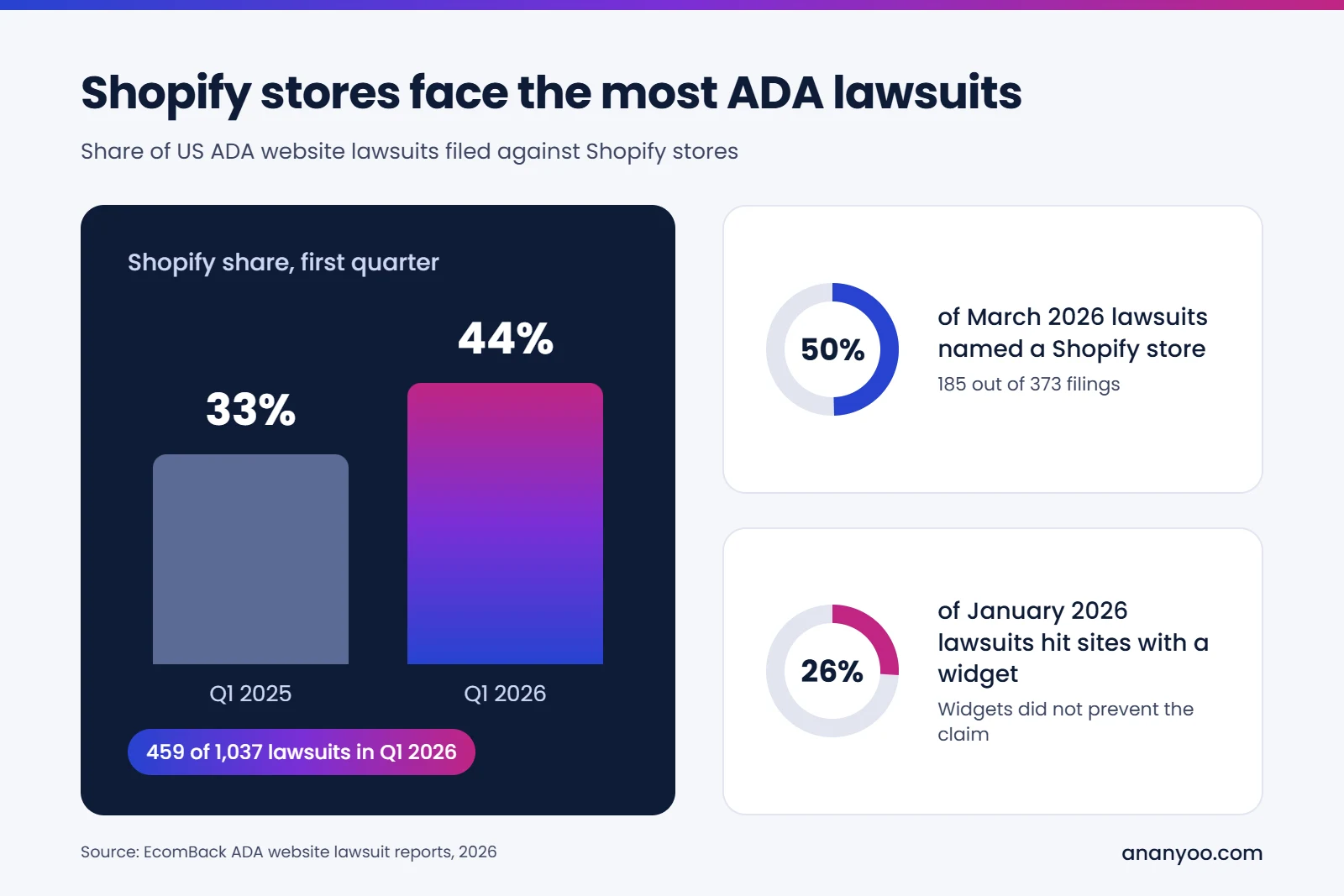
If you still doubt why Shopify ADA compliance matters, the numbers this year are hard to ignore. In the first quarter of 2026, 1,037 ADA website lawsuits were filed in the US, and 459 of them, about 44%, were against Shopify stores. In the same quarter of 2025, Shopify's share was about 33%, so it has grown by more than ten points in one year, according to the EcomBack Q1 2026 lawsuit report. In March 2026 alone, nearly half of all filings, 185 out of 373, named a Shopify store.
The reasons are simple. Shopify is the most popular store builder for small and mid-sized US brands. Online shopping is the easiest place to prove a barrier, because a checkout that fails is clear evidence. And plaintiff firms use automated tools that can spot a Shopify store and its common theme problems in seconds.
Restaurants and fashion brands were among the most targeted sectors in early 2026, but in our own work we see letters going to stores selling everything from supplements to furniture. Size of the business does not matter much. Small stores are often easier targets, because nobody has tested them.
Is Shopify ADA compliant out of the box?
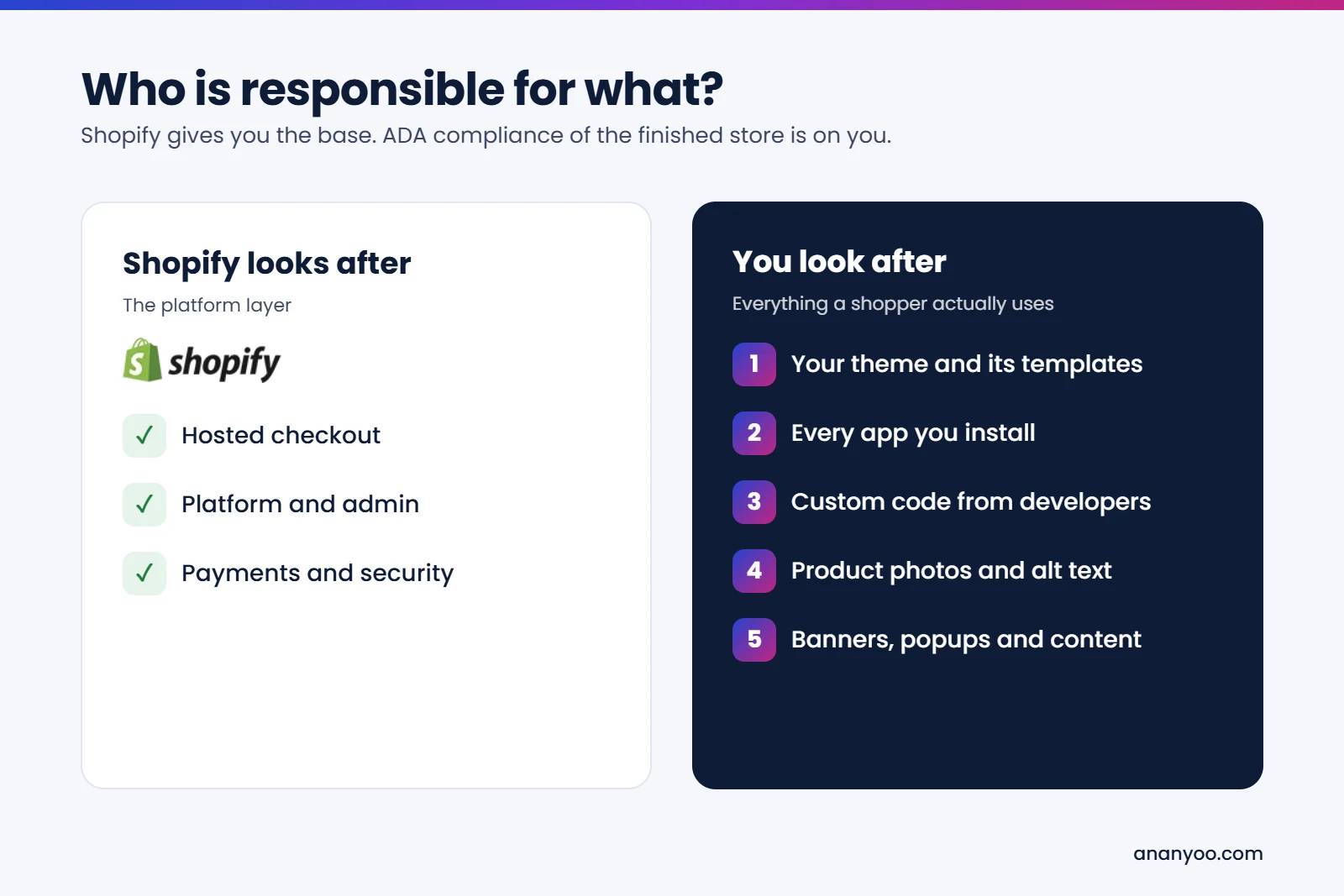
This is the question every store owner asks, and the honest answer is no. Shopify gives you a solid base. Its hosted checkout is maintained by Shopify, and its newer free themes have improved a lot. But Shopify ADA compliance depends on everything you build on top of that base.
Your theme, the apps you install, the custom code your developer adds and the content you upload are all your responsibility. Courts look at the store a shopper actually uses, not at the platform underneath it. Saying "we use Shopify" has never worked as a defence.
This is also why two stores on the same theme can carry very different risk. One owner writes proper alt text and keeps apps to a minimum. Another adds ten apps, a popup, an autoplay slider and image-only banners. The second store is usually the one that gets the letter.
7 costly Shopify ADA compliance mistakes
These are the problems we find most often when we audit Shopify stores. Most of them are also the exact issues listed in demand letters, and fixing them is the core of Shopify ADA compliance.
1. Product images without useful alt text
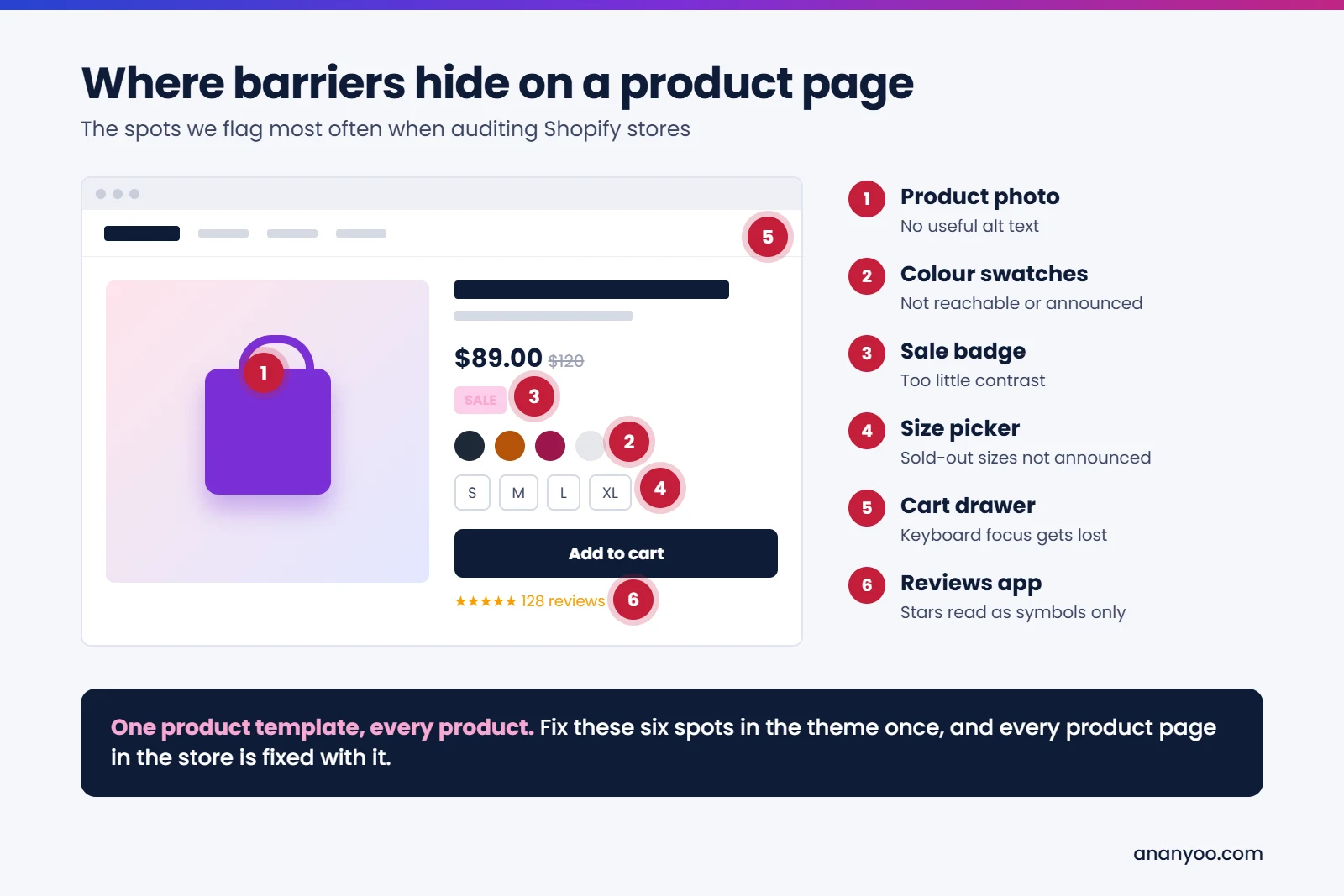
Many stores leave alt text empty, or let it default to the file name, such as IMG_4521. A screen reader user then hears nothing useful about the product. Good alt text describes what a sighted shopper would notice: colour, style, material and what the photo shows. Purely decorative images should have empty alt text, so screen readers skip them.
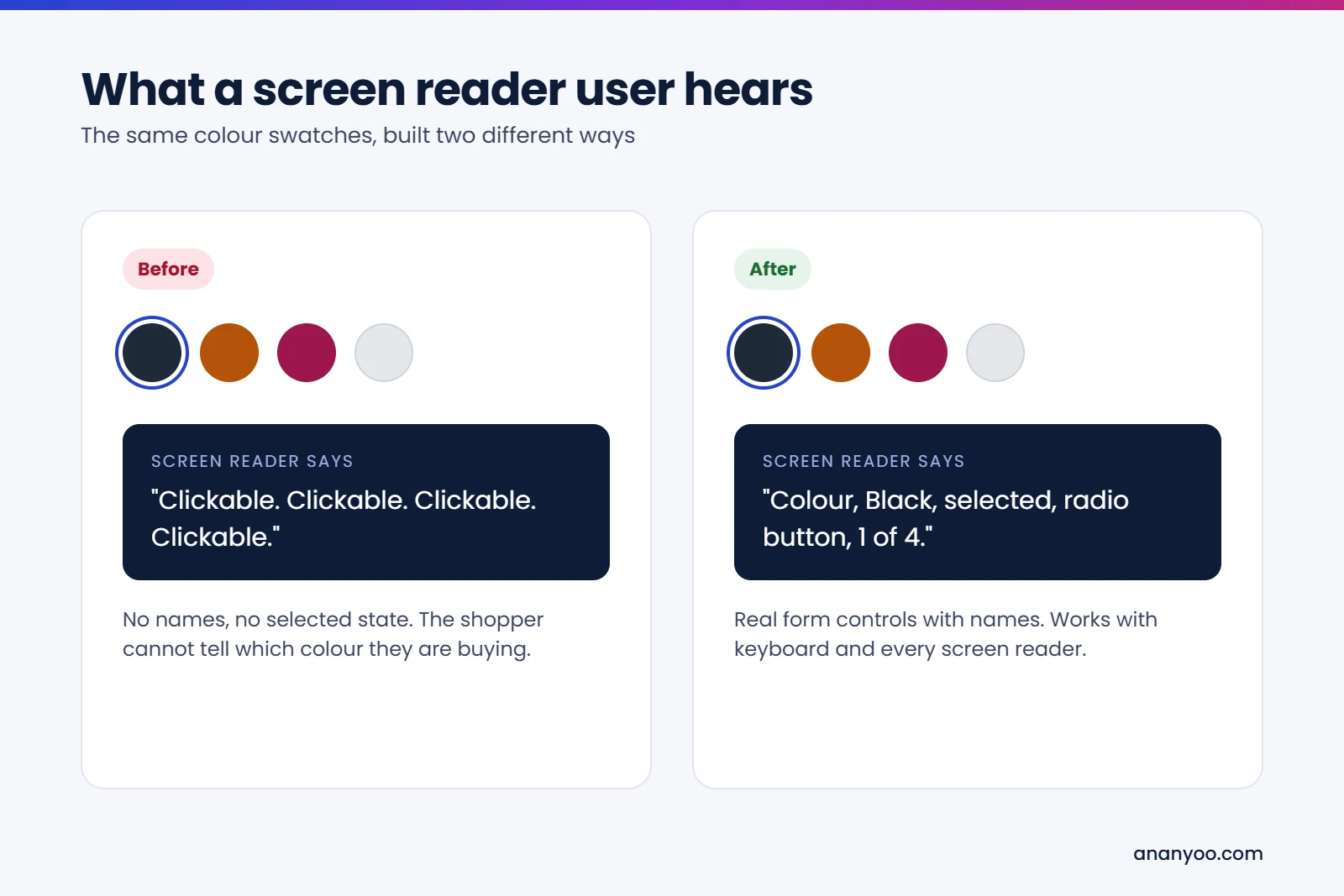
2. Colour swatches and size pickers that are not announced
Variant pickers are often built as coloured circles or styled boxes that look like buttons but are not real buttons. A keyboard user cannot reach them, and a screen reader does not say which colour or size is selected, or that a size is sold out. This one problem can block a sale completely, which is why it shows up in so many complaints.
3. Sliders and banners that move on their own
Autoplay hero sliders are popular on Shopify homepages. If they move without a pause button, they fail WCAG and confuse screen reader and low-vision users. Many sliders also put the offer text inside the image, so the sale message cannot be read at all. Use real text over the image and a visible pause control, or simply use one static banner.
4. Popups and cart drawers that trap the keyboard
Email signup popups, age checks and slide-out cart drawers are common trouble spots. Often the keyboard focus stays behind the popup, or gets stuck inside it with no way out. The fix is to move focus into the popup when it opens, let the Escape key close it, and return focus to the button that opened it.
5. Third-party apps that bring their own barriers
Apps are the biggest hidden risk to Shopify ADA compliance. Review widgets, live chat, upsell offers, wishlist buttons and size charts are mostly built by outside developers. Each one adds new code to your store, and many are never tested with screen readers. Before installing an app, test it with a keyboard. If you cannot use it without a mouse, ask the developer for a fix or choose another app.
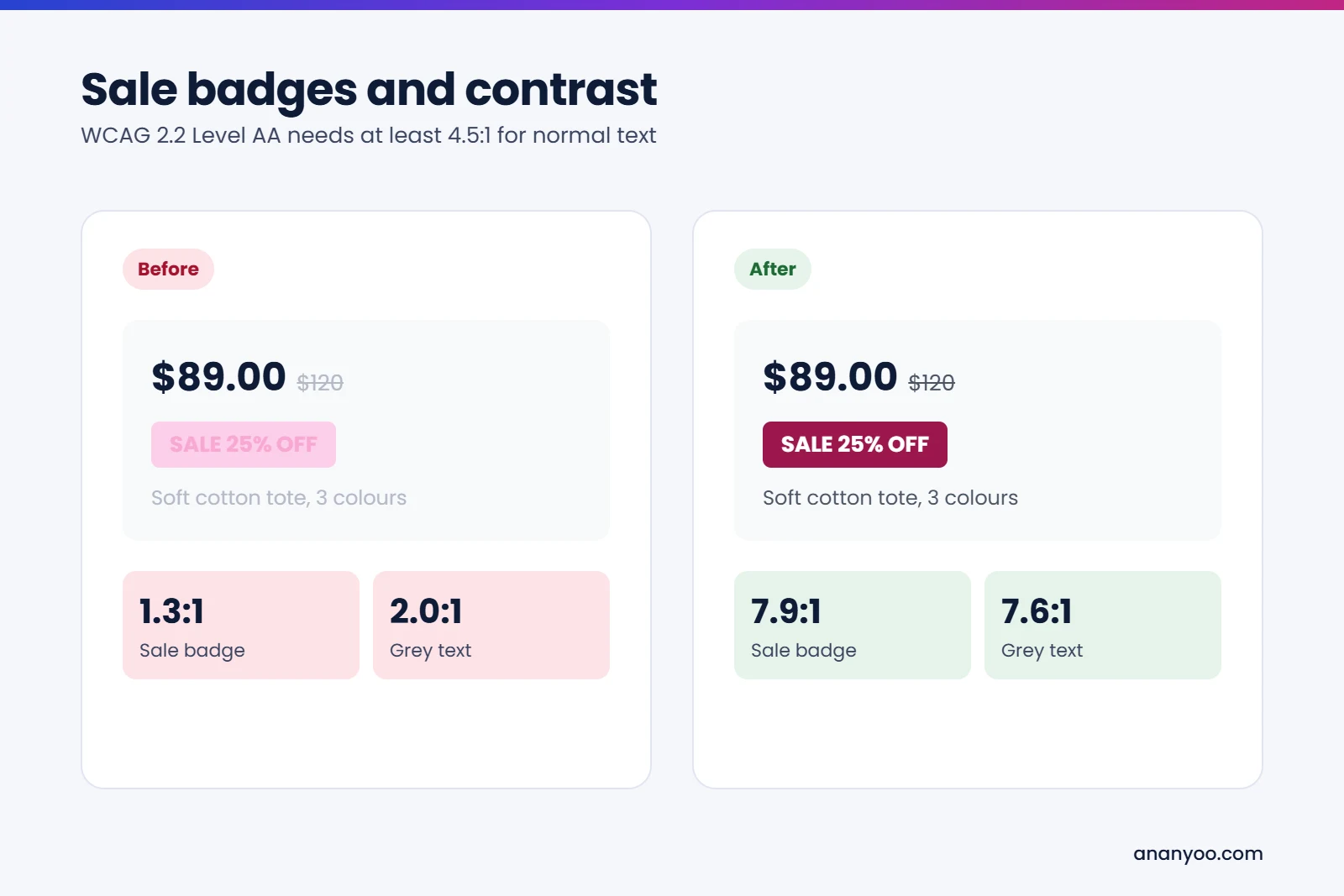
6. Low contrast sale badges, prices and buttons
Light grey text on white, pale pink sale badges and thin fonts on photos are very common on fashion and beauty stores. WCAG 2.2 Level AA asks for a contrast ratio of at least 4.5:1 for normal text. Low contrast hurts older shoppers and people with low vision, who are a large part of any customer base. Fixing contrast is one of the quickest wins for Shopify ADA compliance.
7. Installing a widget instead of fixing the store
Many Shopify owners add an accessibility widget app and believe their Shopify ADA compliance work is done. The widget does not repair your theme code, and in January 2026, 26% of ADA website lawsuits were filed against sites that already had a widget installed. We have covered this in detail in accessibility overlays: pros and cons explained.
How to make your Shopify store ADA compliant
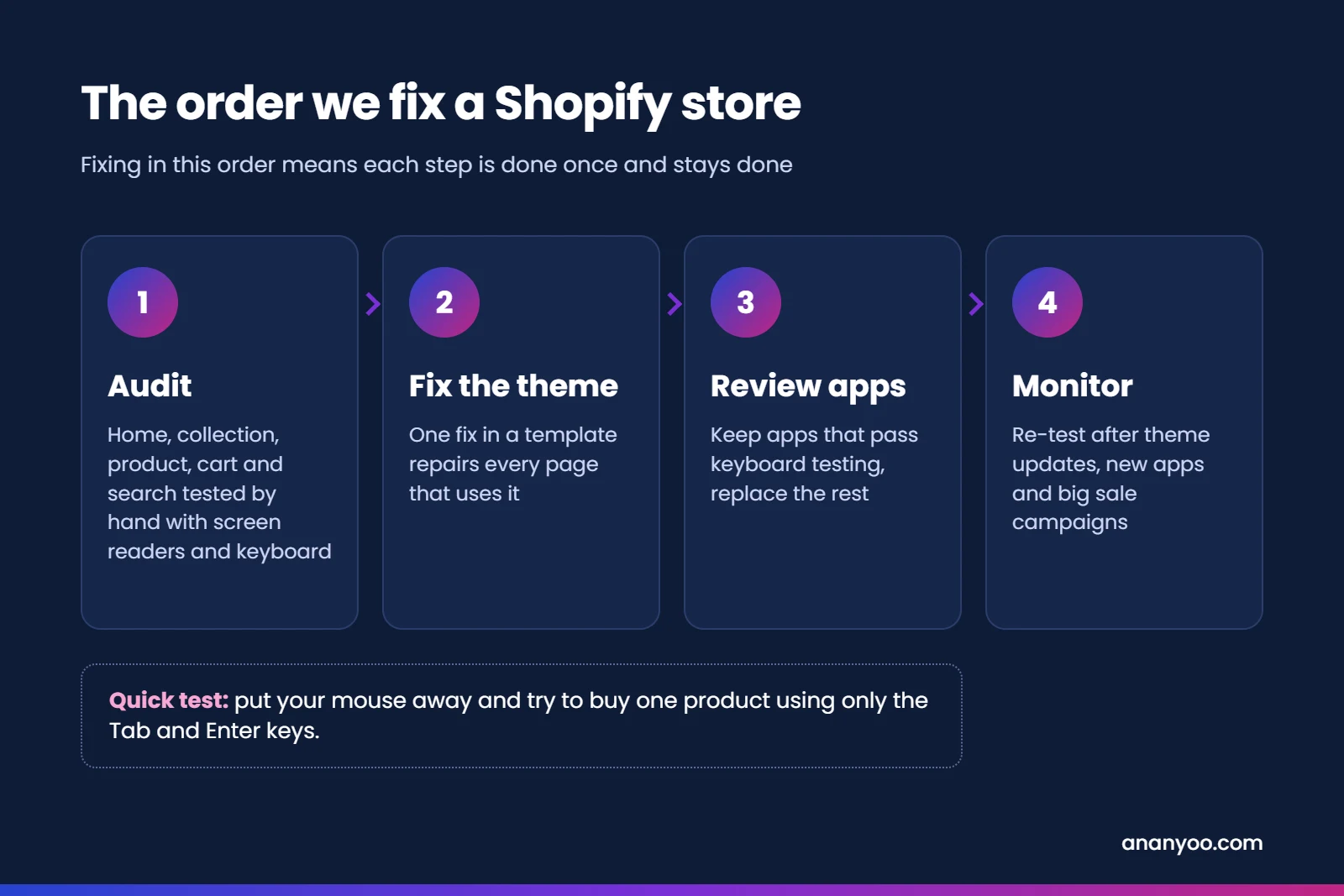
Real Shopify ADA compliance is not a one-time scan. It is a short project followed by regular care. This is the order we follow with our clients:
- Audit by hand: test your key templates, home, collection, product, cart, search and account pages, with screen readers and a keyboard, against WCAG 2.2 Level AA.
- Fix the theme first: one fix in a theme template repairs every product page that uses it.
- Review every app: keep the ones that pass keyboard testing and replace the rest.
- Clean up content: alt text, headings, link text and image-only banners.
- Publish an accessibility statement with a working contact email.
- Re-test regularly: after every theme update, new app or big sale campaign.
A real example: our accessible Shopify theme
Advice on Shopify ADA compliance is useful, but a working store is better proof. So we built our own Ananyoo Shopify Accessibility and ADA Compliance Theme, a ready Shopify theme made to meet WCAG 2.2 AA in the code itself, not with an overlay on top. Every store we build on it is tested by hand with JAWS, NVDA, VoiceOver and TalkBack before launch.
It was designed around the same seven mistakes listed above, so most Shopify ADA compliance problems are solved before you add a single product:
- Product images come with clear alt text fields and guidance, so photos are described properly.
- Colour swatches and size pickers are real form controls that announce the selected option and sold-out sizes.
- Banners and sliders never move on their own, and offer text stays as real text.
- The cart drawer and popups move focus correctly, close with Escape and return focus to where you were.
- Sale badges, prices and buttons use colour pairs that pass the 4.5:1 contrast ratio.
- No accessibility widget is needed, because the barriers are fixed at the source, which is what real Shopify ADA compliance needs.
Starting a new store or a redesign on an accessible theme makes Shopify ADA compliance much easier, and it saves a lot of fixing later. You can see our other platform themes on our accessible themes page, and the results on real projects in our case studies.
Already received a demand letter?
If your Shopify store has already received a letter, do not panic and do not pay in a hurry. Read our guide on what to do after an ADA demand letter for the eight steps to take, then get the store audited and fixed properly. Done well, Shopify ADA compliance also gives you a written record that your attorney can use. A store with a documented audit and a clear fix log is in a much stronger position than one with a widget and no record.
How Ananyoo can help
I am Shivaji Mitra, a DHS Trusted Tester, working in web development and accessibility since 2003, and our audit team is IAAP certified. For Shopify ADA compliance, we audit stores by hand, fix the theme and app issues in the code, and give you a clear report you can keep for your records.
You can read more about our website accessibility audit, our accessibility remediation work and our monitoring and maintenance plans. Send us your store address through our contact page, and you will get a written reply within one working day.
Frequently asked questions
Is Shopify ADA compliance the store owner's responsibility?
Yes. Shopify maintains its own checkout, but your theme, apps and content are your responsibility under the ADA.
Which WCAG level should my Shopify store meet?
WCAG 2.1 Level AA is the working benchmark used in most settlements, and WCAG 2.2 Level AA is the better target for any new work.
Will a free Shopify theme make my store compliant?
A modern free theme is a good start, but apps, custom code and content can still add barriers. The finished store always needs testing before you can claim Shopify ADA compliance.
How long does Shopify ADA compliance take for a typical store?
For most small and mid-sized stores, a proper audit and fix takes a few weeks, depending on the number of templates and apps.
